MANANOVIA
See your effort. Build the strength to keep going.
A learning-habit platform that connects the start of study for middle and high school students with quick reflection and visible progress. Across 55 screens for students, guardians, educational organizations, and operators, it provides weekly reports, a private online study room, learning trend insights, and support for meetings.
View service overview slidesUpdated: 8/2026
The video is in Japanese.
System Architecture
Students log their study in the app, while parents and schools use the web. Records flow through the API on Cloudflare into Neon, and Workflows build weekly reports that are sent by email and push.
 Cloudflare Workers








- Students log study in the Expo app, which saves on the device and syncs later. Parents and schools use the Next.js web app.
- Both go through the API on Cloudflare Workers (Hono and Better Auth); data is stored in Neon via Hyperdrive, and files in R2.
- The online study room runs on Durable Objects.
- Queues and Workflows build weekly reports and deliver them by Resend email and Expo Push / Web Push. Payments go through Stripe.
Drag to move the diagram. Click it first to zoom with the mouse wheel.
Drag to move the diagram, and use the buttons at the top right to zoom.
With a keyboard, use the arrow keys to move, + and − to zoom, and 0 to reset.
Business Model
Schools pay MANANOVIA a plan fee based on seats, and sell their own parent subscriptions at prices they set. The two payments flow through separate routes.

- Schools pay MANANOVIA a plan fee based on seats and use its insights and meeting tools.
- Parents pay schools a subscription priced by each school, through Stripe. This is separate from the plan fee.
- Students record their daily study, and MANANOVIA sends weekly reports to parents.
- Parents cheer students on through the app.
Drag to move the diagram. Click it first to zoom with the mouse wheel.
Drag to move the diagram, and use the buttons at the top right to zoom.
With a keyboard, use the arrow keys to move, + and − to zoom, and 0 to reset.
Key Features
From starting a study session to guardian support, classroom operations, and service administration, 55 screens help students keep learning.
From starting a study session to seeing growth
The home screen shows today's goal, recent study topics, and weekly progress, then lets students start studying immediately. During a session, the interface keeps attention on elapsed time and the goal; growth reports show total time, study days, subject balance, and daily trends.
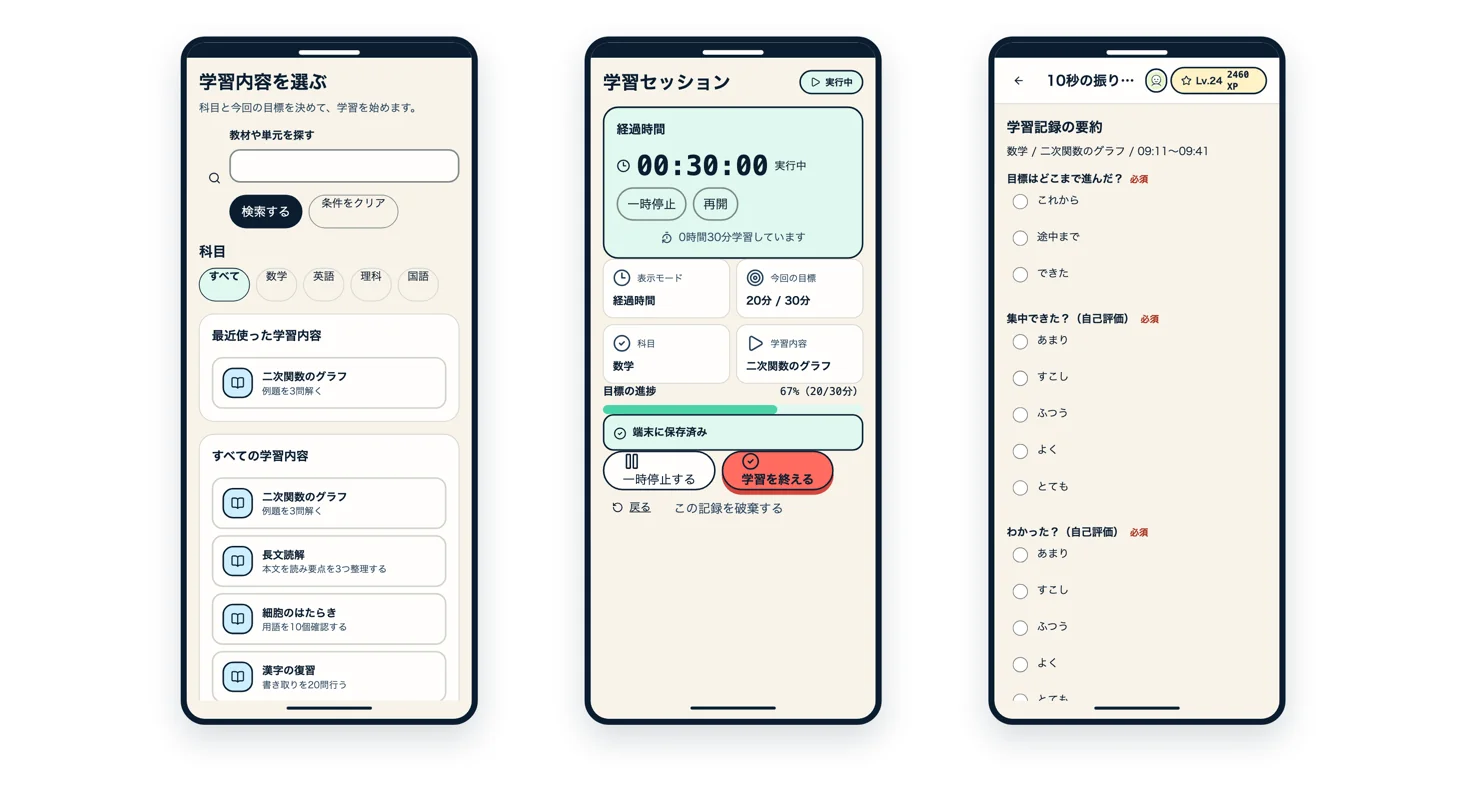
Study sessions and a 10-second reflection
Students choose what to study and the goal for the session, then start with that context. At the end, they select progress, focus, and understanding to record how the session felt in ten seconds.
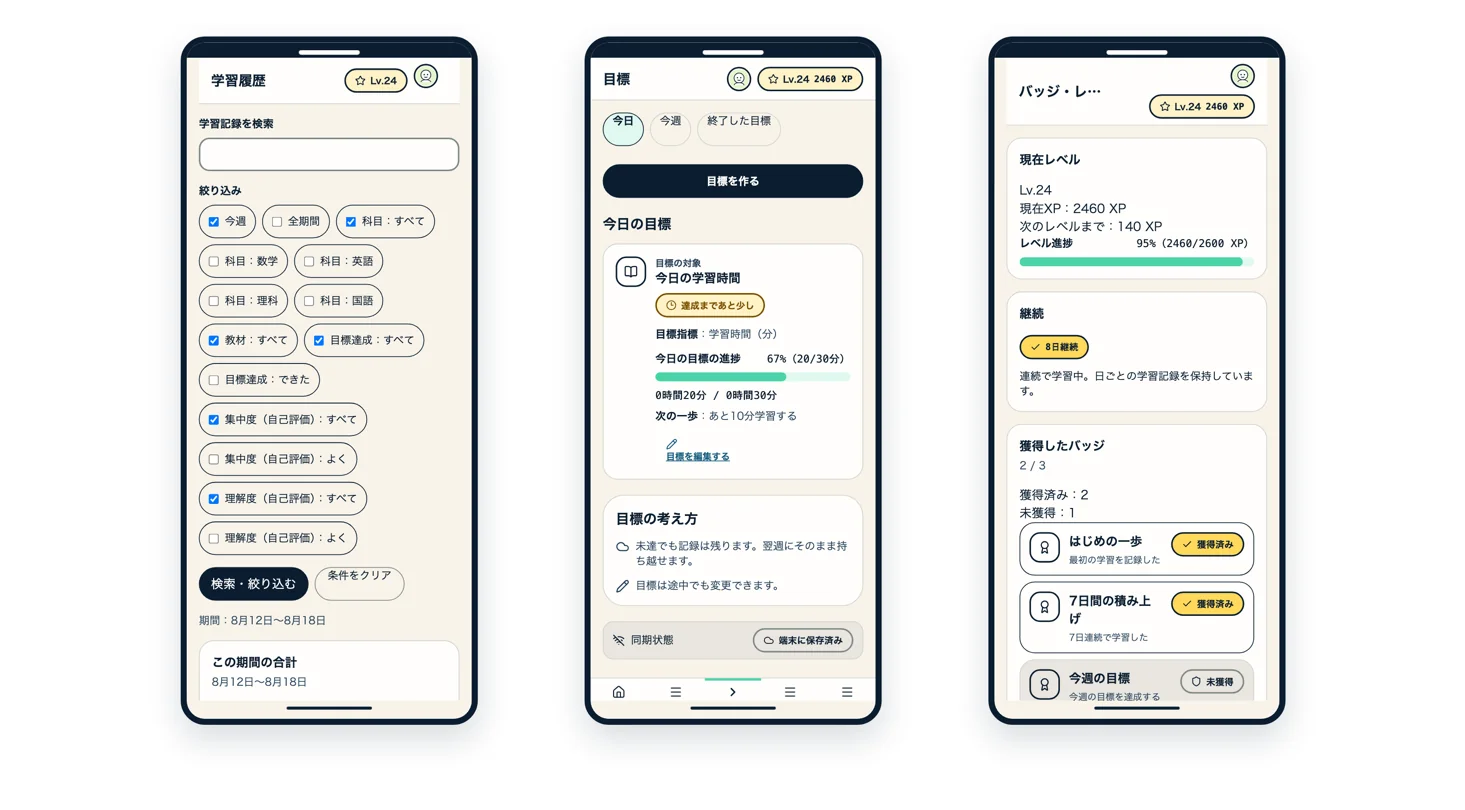
History, goals, and badges
Students review past study records by date and check progress toward today's and this week's goals. Levels, streaks, earned badges, and weekly quests make their accumulated effort visible.
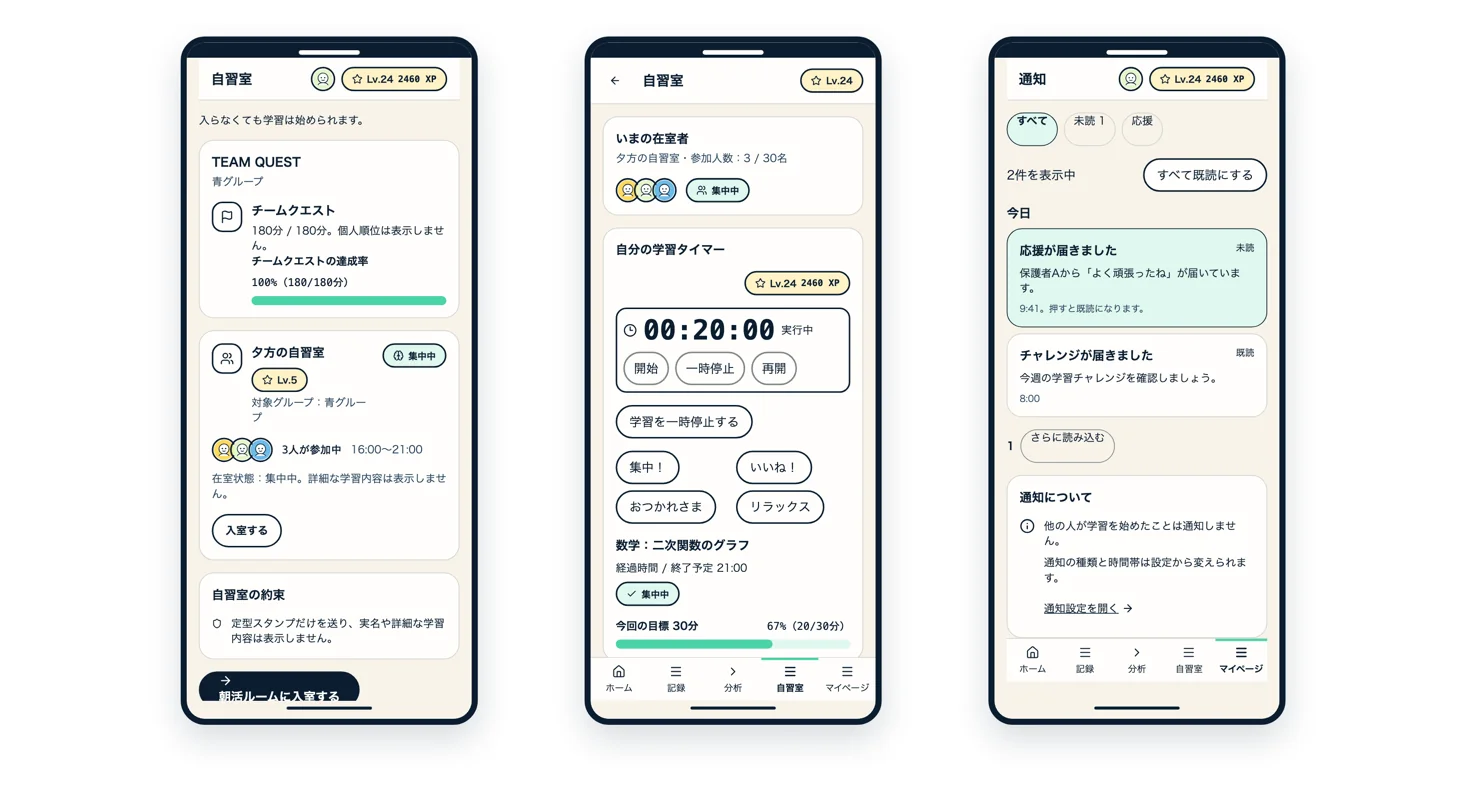
An online study room for learning with peers
Students can see available rooms and current participants, then continue studying with a sense of their peers nearby. Preset stamps support lightweight interaction, while the notification list shows unread notices and encouragement from guardians.
Weekly reports for guardians
Reports summarize study time, study days, subject breakdown, goal achievement, streaks, and changes from the previous week. Subject details appear in charts and tables, and guardians can send encouragement within the permitted sharing scope.
A classroom dashboard that surfaces students who may need support
The dashboard prioritizes signs of study stoppage, unhandled support candidates, and unhandled reports so staff can find the next student to support. It also shows candidate lists, study-time trends, and execution rates by class.
Student-level learning trends
Within the permitted sharing scope, staff can review each student's weekly study volume, execution rate, and subject breakdown. Study-time trends against goal and actual lines provide material for meetings and follow-up.
Meeting reports and PDF export
Select a student, period, and report fields to preview shareable aggregates such as study time, subject breakdown, and goal achievement. Confirm the contents, create a meeting PDF, and record the export action in the audit log.
Report handling and participation limits
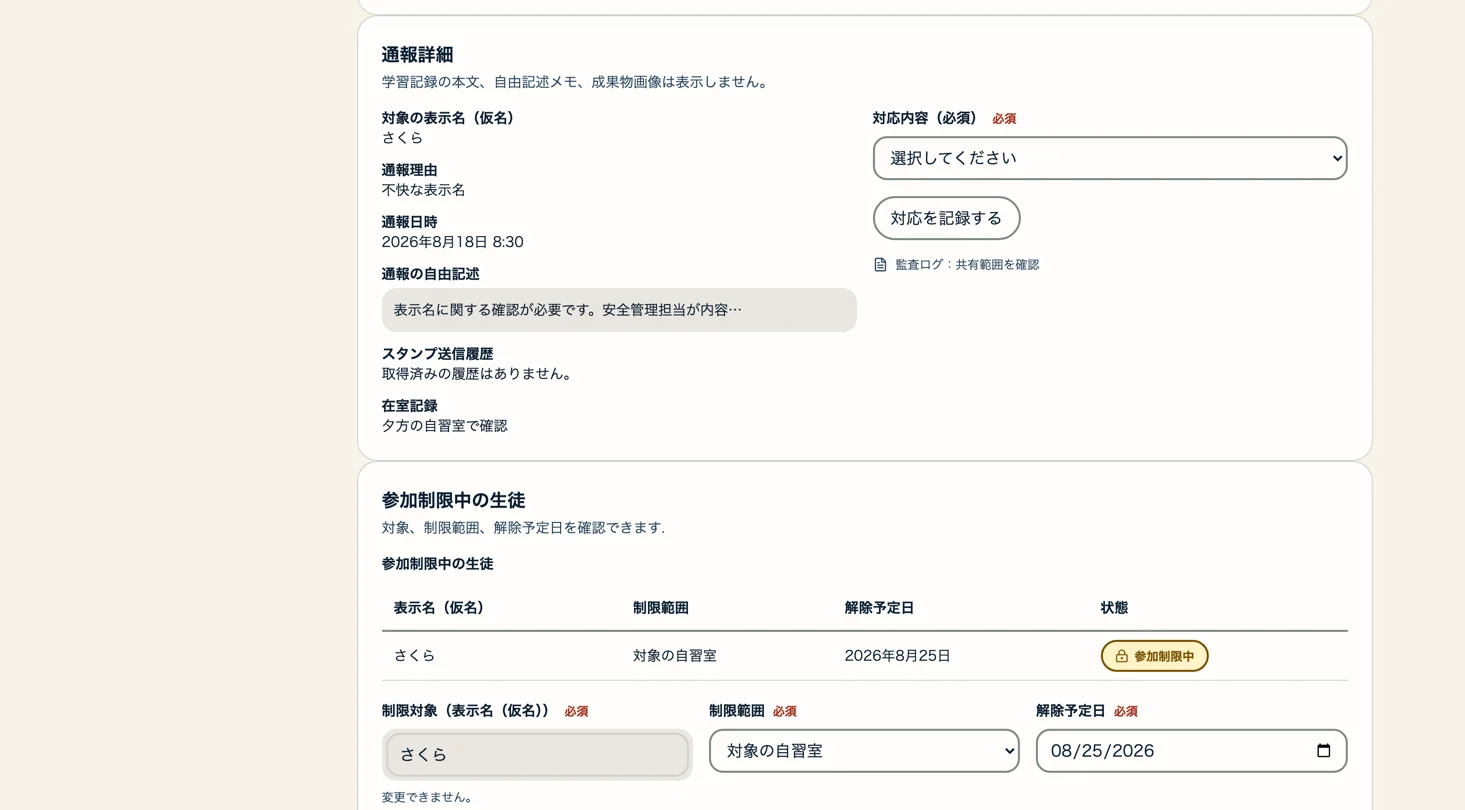
Open an unhandled incident report and review the reported user, reason, stamp history, and room attendance in one view. Keep the response record separate from participation limits, and confirm the subject, scope, and planned end date when applying a limit.
Service status monitoring
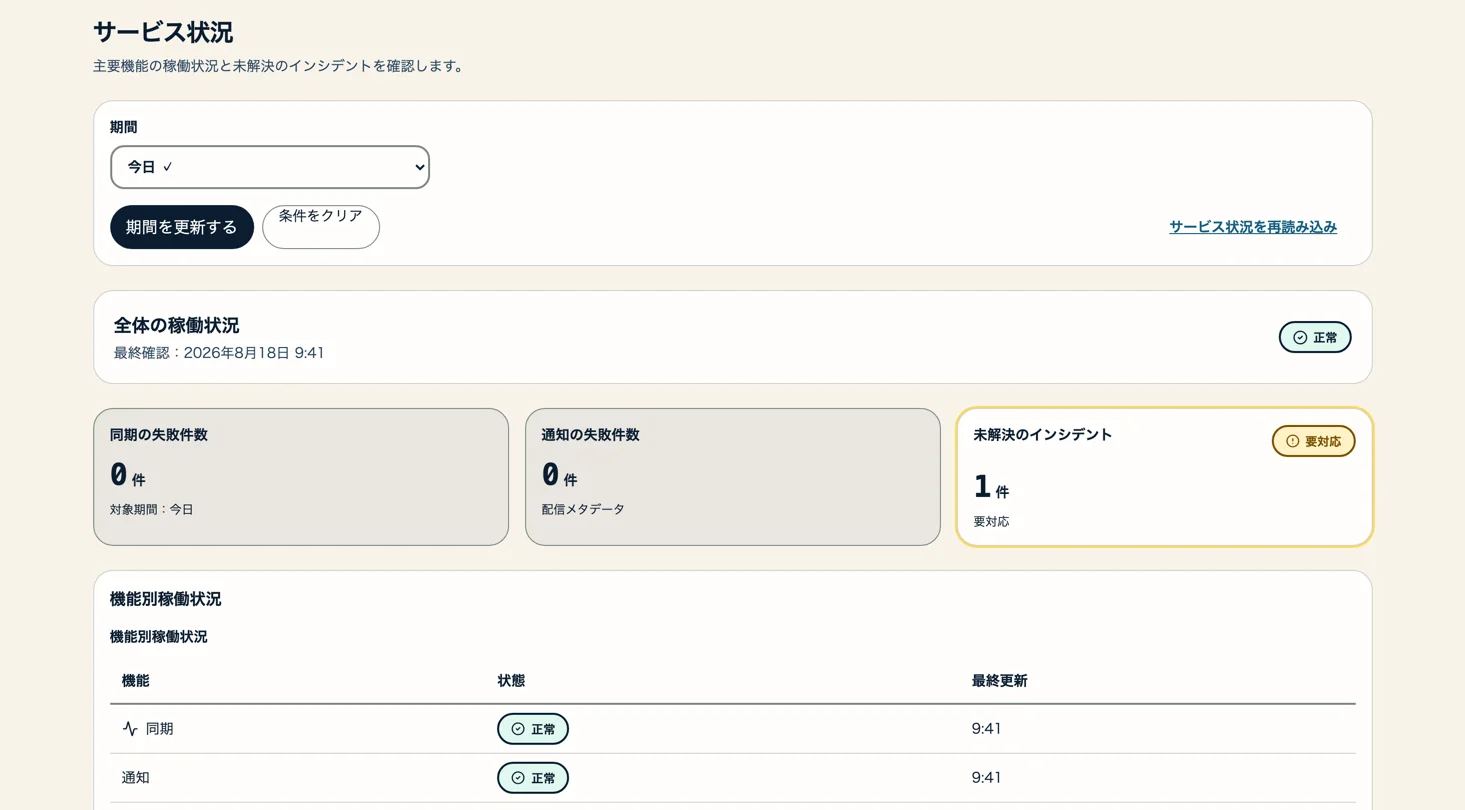
Review overall service status, sync and notification failures, and feature-level status on one screen. Links to unresolved incidents and response history make it possible to track the situation across periods.
From starting a study session to seeing growth
The home screen shows today's goal, recent study topics, and weekly progress, then lets students start studying immediately. During a session, the interface keeps attention on elapsed time and the goal; growth reports show total time, study days, subject balance, and daily trends.
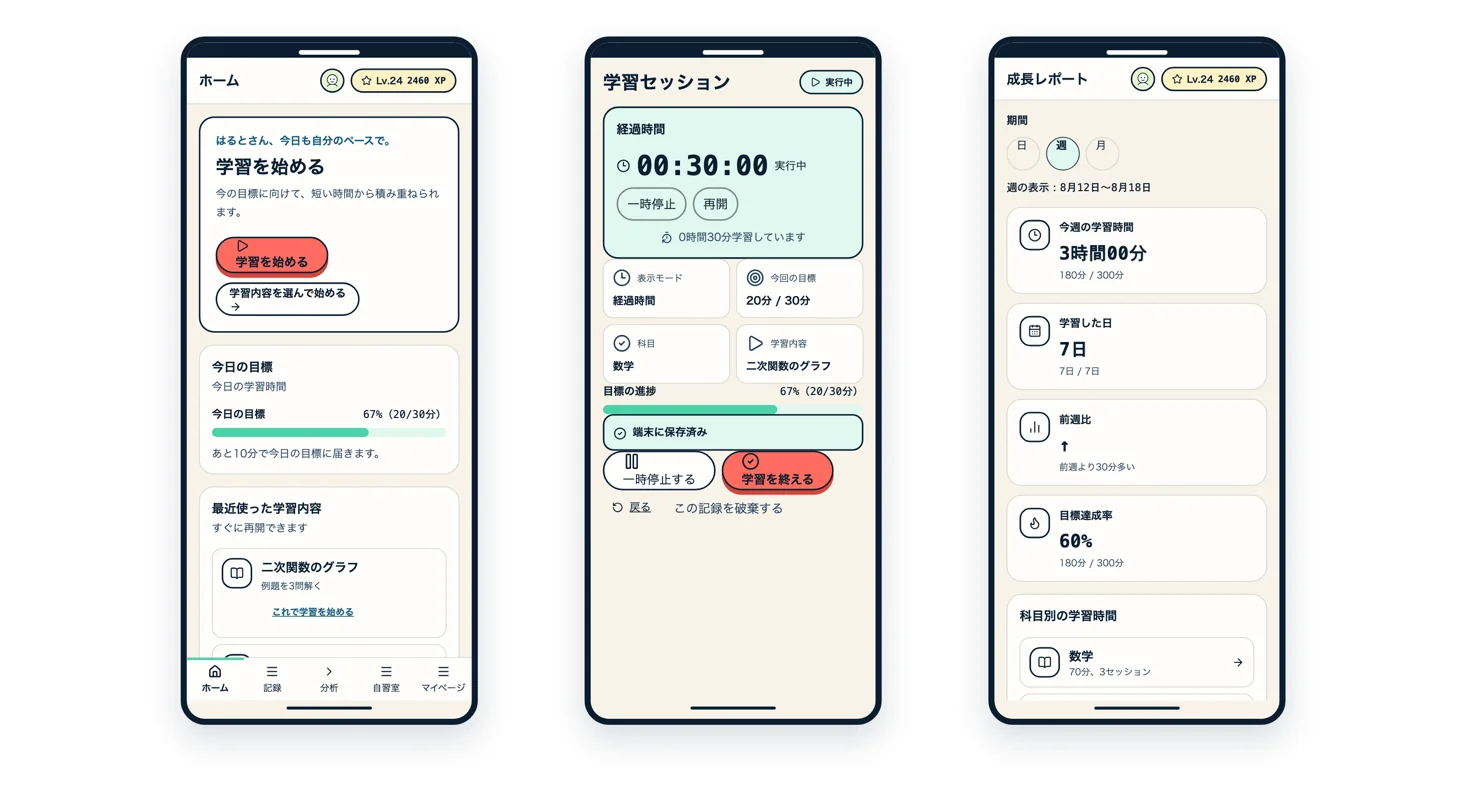
Study sessions and a 10-second reflection
Students choose what to study and the goal for the session, then start with that context. At the end, they select progress, focus, and understanding to record how the session felt in ten seconds.
History, goals, and badges
Students review past study records by date and check progress toward today's and this week's goals. Levels, streaks, earned badges, and weekly quests make their accumulated effort visible.
An online study room for learning with peers
Students can see available rooms and current participants, then continue studying with a sense of their peers nearby. Preset stamps support lightweight interaction, while the notification list shows unread notices and encouragement from guardians.
Weekly reports for guardians
Reports summarize study time, study days, subject breakdown, goal achievement, streaks, and changes from the previous week. Subject details appear in charts and tables, and guardians can send encouragement within the permitted sharing scope.
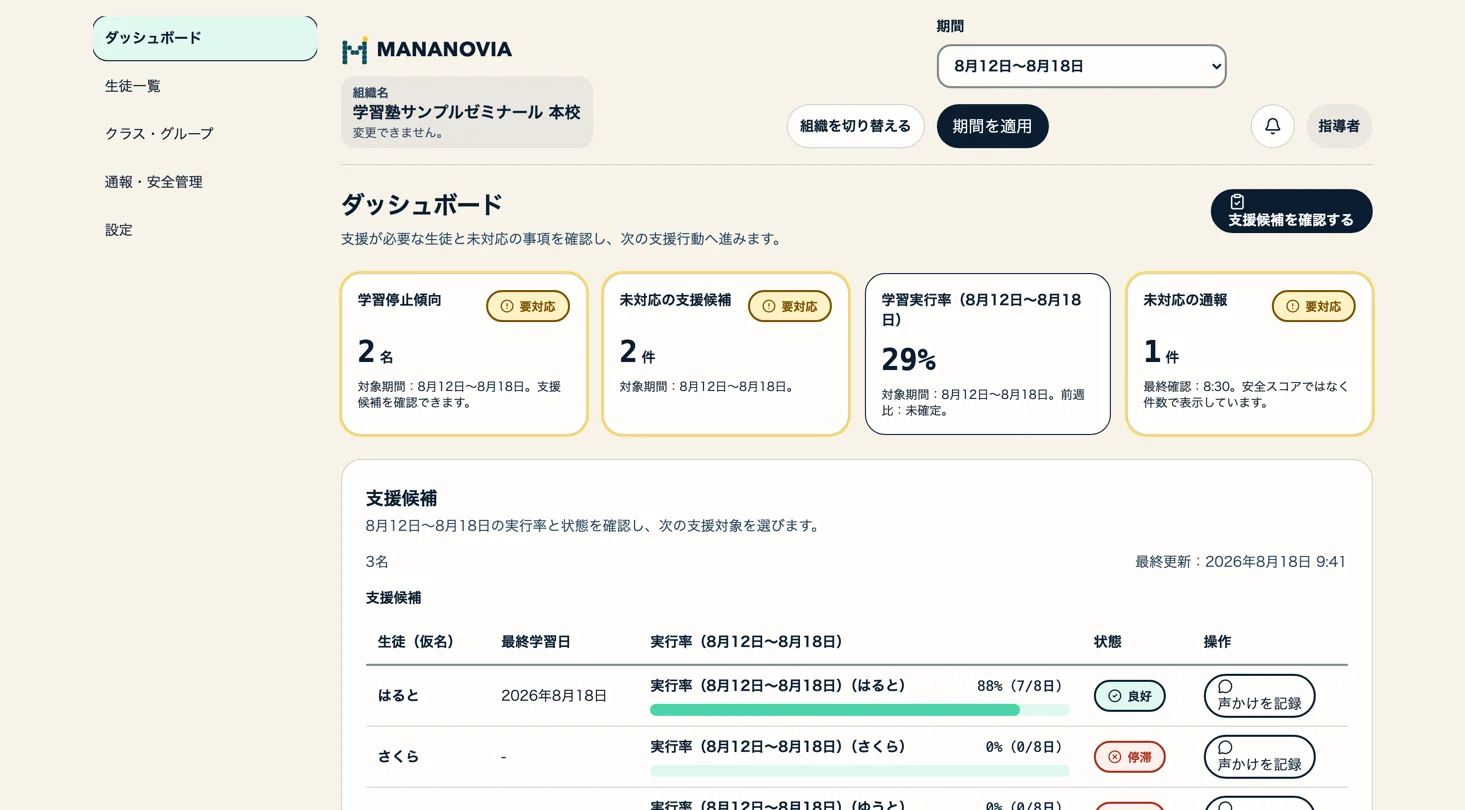
A classroom dashboard that surfaces students who may need support
The dashboard prioritizes signs of study stoppage, unhandled support candidates, and unhandled reports so staff can find the next student to support. It also shows candidate lists, study-time trends, and execution rates by class.
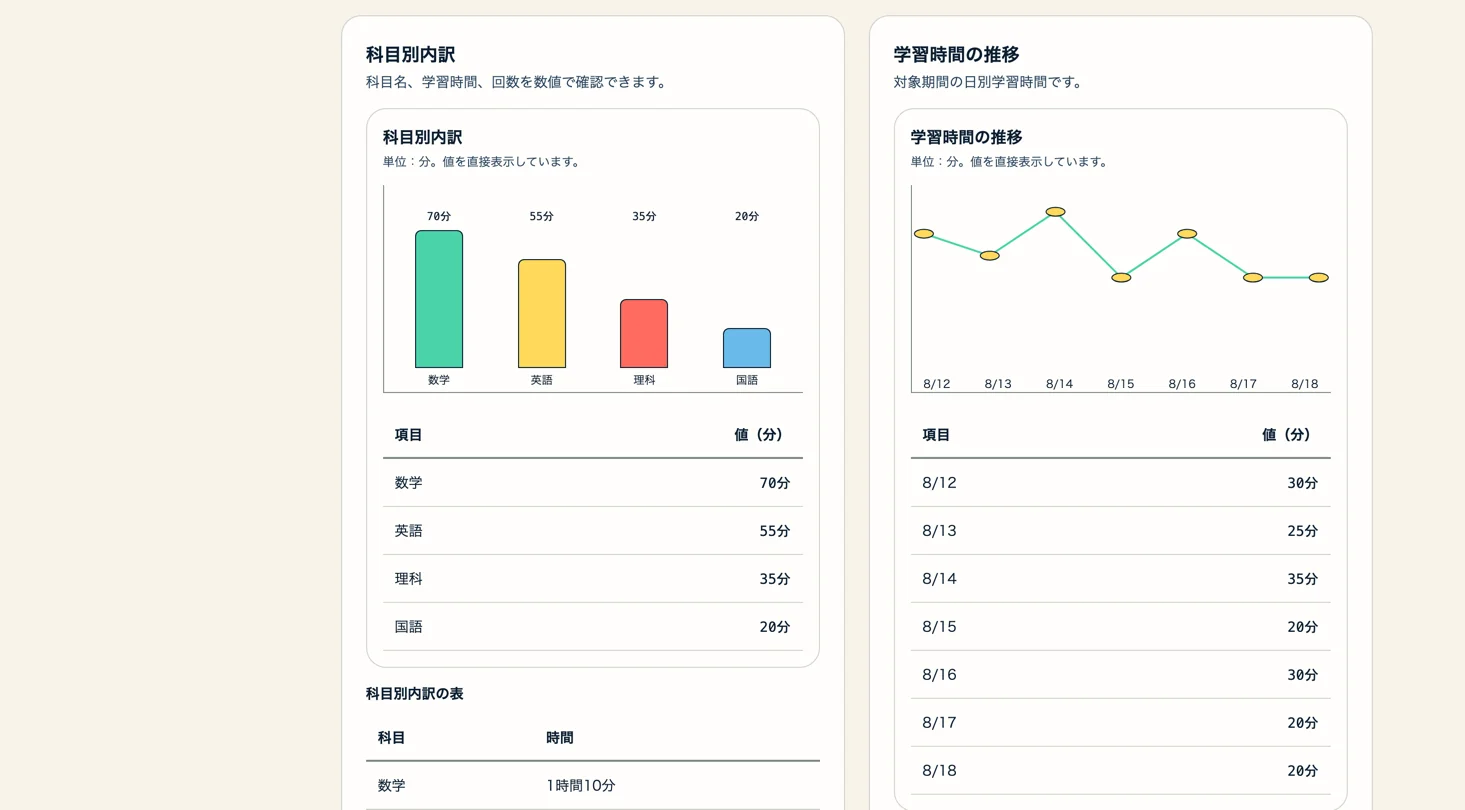
Student-level learning trends
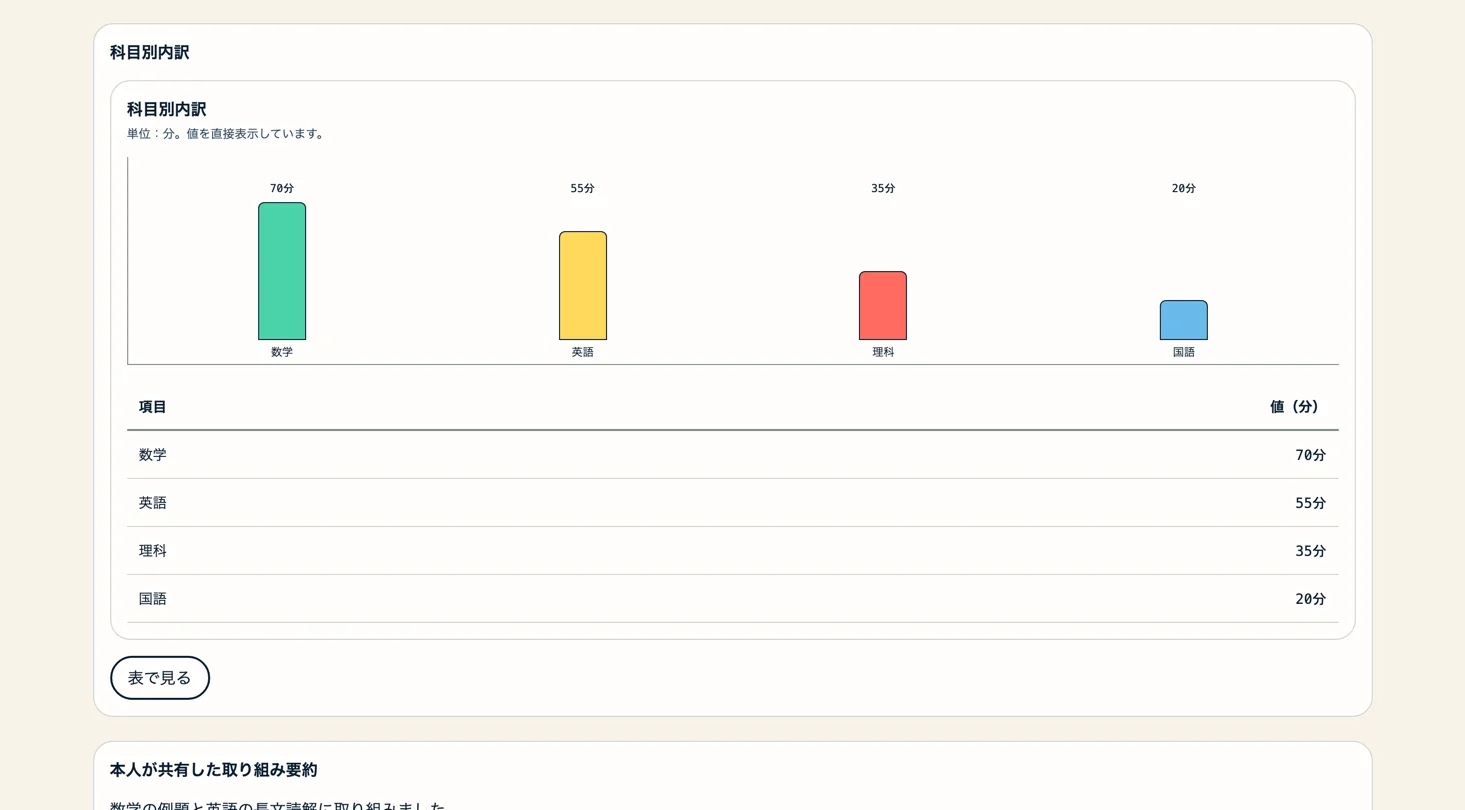
Within the permitted sharing scope, staff can review each student's weekly study volume, execution rate, and subject breakdown. Study-time trends against goal and actual lines provide material for meetings and follow-up.
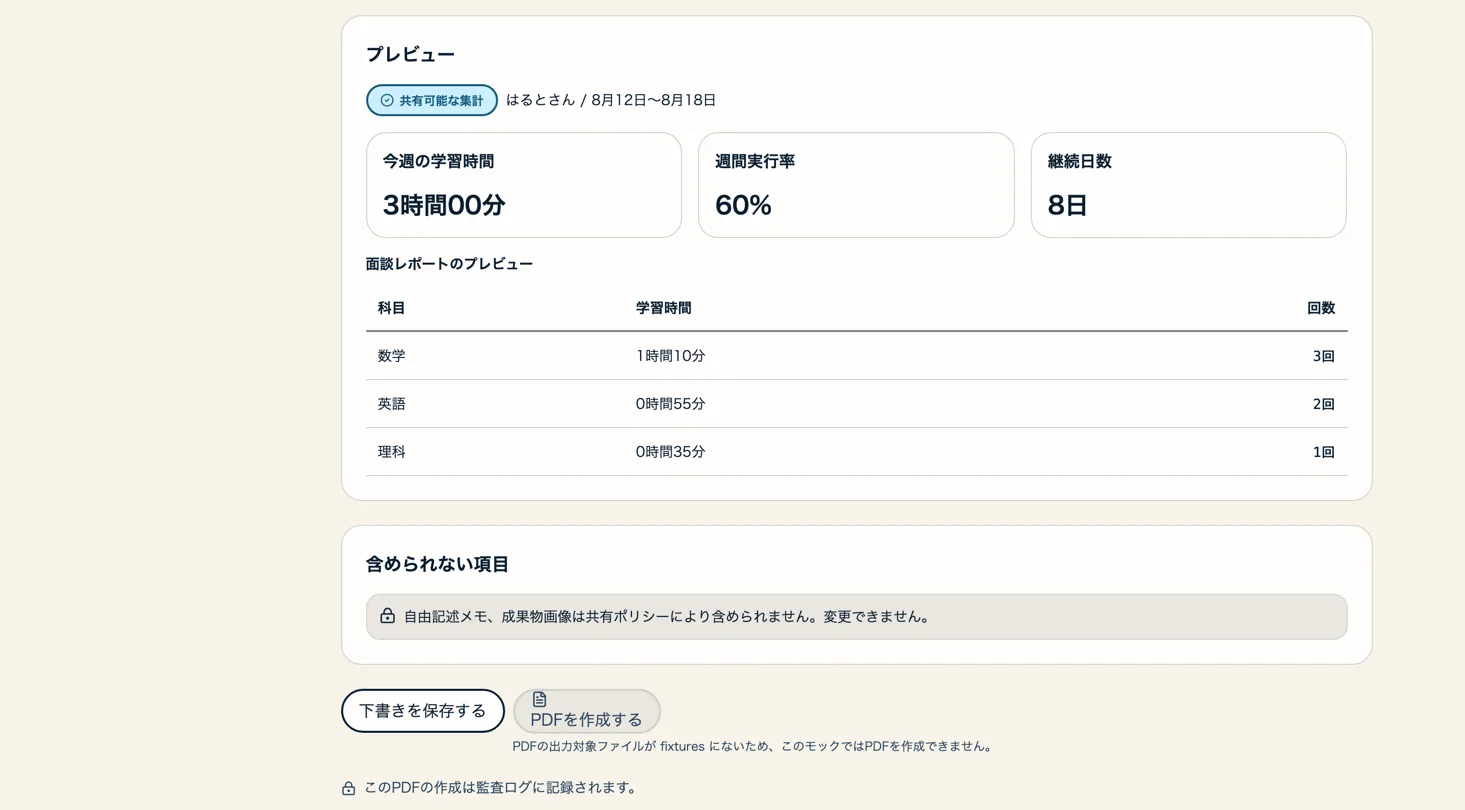
Meeting reports and PDF export
Select a student, period, and report fields to preview shareable aggregates such as study time, subject breakdown, and goal achievement. Confirm the contents, create a meeting PDF, and record the export action in the audit log.
Report handling and participation limits
Open an unhandled incident report and review the reported user, reason, stamp history, and room attendance in one view. Keep the response record separate from participation limits, and confirm the subject, scope, and planned end date when applying a limit.
Service status monitoring
Review overall service status, sync and notification failures, and feature-level status on one screen. Links to unresolved incidents and response history make it possible to track the situation across periods.
Project Overview
Technology Stack (12 technologies)
- Next.js (App Router) + OpenNext
- Expo + React Native
- React + TypeScript
- Tailwind CSS + shadcn/ui
- Hono + Zod + OpenAPI 3.1
- Better Auth
- Neon PostgreSQL + Drizzle ORM
- Expo SQLite
- Cloudflare Workers (Hyperdrive / Queues / Workflows)
- Cloudflare Durable Objects + WebSocket Hibernation API
- Cloudflare R2
- Resend + Expo Notifications + Web Push
Implemented Features (9 features)
- One-tap study timer and end-of-session reflection
- Study history, goals, and growth reports
- XP, levels, streaks, badges, and quests
- Private online study room and preset stamps
- Guardian connections, weekly reports, and encouragement
- Classroom dashboard and student-level learning analytics
- Meeting reports and PDF export
- Incident-report handling, participation limits, and audit logs
- Service status and incident management
We can build a similar system for your business.
Build a dedicated SaaS product with ¥0 initial cost in 2–6 weeks using the SDK and AI.